


Manual billing processes often strain resources in ways not immediately visible on the balance sheet. When utility teams rely on spreadsheets or outdated systems, every invoice demands multiple manual touchpoints — data entry, verification, printing, mailing, payment posting and customer inquiries.
Each manual step creates opportunities for errors that can quickly escalate into significant problems, consuming hours in research, multiple customer interactions and potential revenue loss from necessary credits or adjustments. Beyond consuming valuable time, these errors erode customer trust and divert your team from higher-value work. For municipalities managing thousands of accounts, these inefficiencies quickly compound.
The real solution isn’t to intensify efforts within an inefficient system. Instead, you need to replace the manual billing process with specialized automated utility billing software. This software must be built for the unique complexities of utility and usage-based billing.
This guide offers a framework for evaluating software options, contrasting generic accounting tools with purpose-built utility billing systems. After reading, you will be able to plan a transition that reduces errors while boosting operational efficiency.
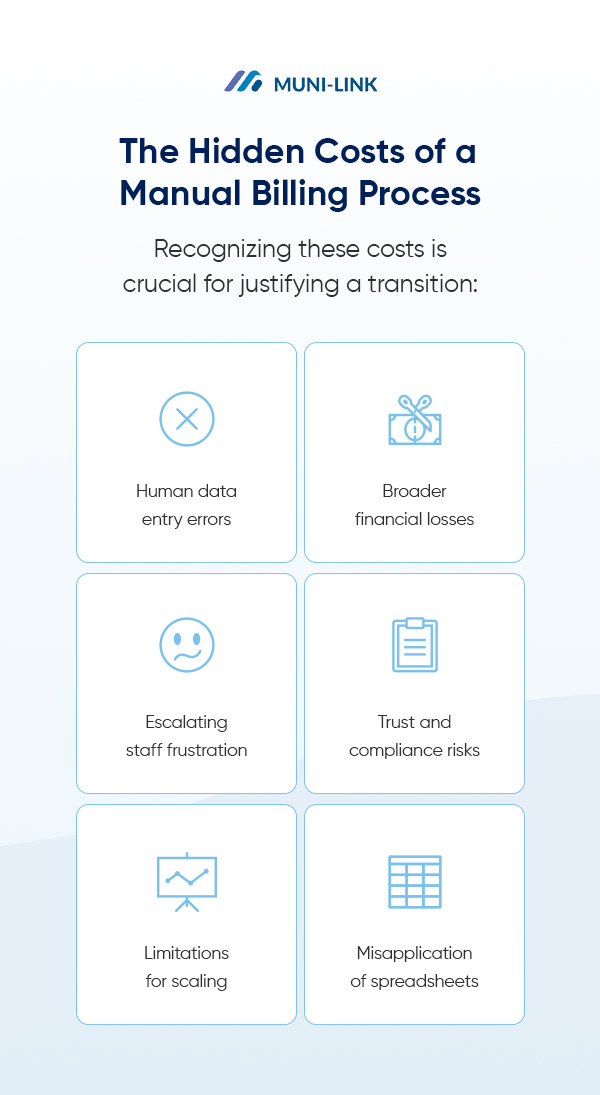
The challenges of manual billing extend well beyond the direct hours staff spend on data entry or invoice printing. Each manual step in your billing workflow carries hidden costs that impact your organization. Recognizing these costs is crucial for justifying a transition:
When organizations move beyond manual processes and spreadsheets, many initially consider popular accounting software as a logical next step. While tools like QuickBooks and FreshBooks serve many businesses effectively, utility billing is fundamentally different from generic business invoicing.
The unique demands of usage-based billing, complex rate structures and municipal compliance simply do not fit a one-size-fits-all model.
Generic accounting tools are engineered for straightforward business transactions — selling services, sending invoices and receiving payments. While this model suits consulting firms, retail businesses and service providers with predictable pricing, it completely breaks down when applied to utility billing.
Utility billing necessitates specialized infrastructure that generic software lacks. This leads to several critical shortcomings:
The disparity between generic capabilities and specific utility billing needs becomes most evident when comparing standard invoicing tools against what utility providers genuinely require. Generic accounting software typically handles:
In contrast, utility billing demands distinct capabilities:
Gaps in Compliance and Reporting
Municipalities encounter reporting requirements that generic software typically cannot support. Regulatory agencies, boards and auditors mandate specific documentation formats, comprehensive compliance reports and detailed transaction histories to demonstrate proper controls.
While generic accounting platforms generate standard financial reports — such as profit and loss statements, balance sheets and accounts receivable — they often lack the specialized reports government entities require. For instance, purpose-built billing software for small municipalities often includes these government-specific reporting frameworks natively.
Without native support for municipal compliance reporting, finance teams spend countless hours each month manually extracting data and crafting custom reports to meet regulatory obligations.
This reliance on manual report generation introduces new opportunities for error and significantly increases audit risk.
Understanding what doesn’t work is only half the solution. The right automated billing systems deliver specific capabilities that eliminate manual effort rather than merely displacing it.
When evaluating software options for transitioning from manual to automated billing, focus on features that directly address your core operational challenges.
A Centralized Customer Information System (CIS)
A customer information system forms the cornerstone of effective utility billing automation. Unlike fragmented generic databases or scattered records across multiple platforms, a true CIS consolidates all account information into a single, accessible system.
Essential capabilities include:
With all relevant account information in one accessible location, staff can respond to inquiries swiftly and accurately.
Purpose-built utility billing software automatically manages rate complexity. These systems incorporate calculation engines designed specifically for usage-based billing.
Key automation features include:
This comprehensive suite of specialized features ensures accuracy while freeing staff from repetitive calculation tasks.
The most significant efficiency gains arise from eliminating manual data entry at its source. Genuine utility billing process automation demands direct connections between your billing system and the devices that capture consumption data.
Integration delivers measurable benefits:
These connections enable complete automation from meter reading through invoice generation, payment processing and financial reconciliation.
Built-in Local Government Compliance

Specialized utility billing software incorporates compliance features specifically designed for municipal and government operations. Rather than treating compliance as an afterthought, these systems embed regulatory requirements directly into their core functionality.
The compliance infrastructure provides:
The prospect of changing core business systems naturally raises concerns about data migration, staff adaptation and potential service disruptions. While these concerns are legitimate, they should not hinder essential progress.
When approached methodically, learning how to automate utility billing becomes a manageable process.
Navigate the Implementation Process
Successful transitions adhere to a structured path that divides the overall project into discrete phases. Specialized billing software providers are well-versed in these implementation challenges.
The process typically includes:
Most organizations complete implementation within several weeks to a few months. This investment in proper setup yields substantial dividends through reduced errors and enhanced efficiency.
Empower Your Team With New Tools
Staff concerns regarding automation often revolve around job security. However, automation’s true impact is handling tedious, repetitive tasks, thereby freeing employees for higher-value projects and strategic work.
This transformation typically includes:
Organizations ultimately benefit from superior customer service, more insightful financial analysis and improved staff retention.
Automated billing delivers benefits such as reduced errors, faster billing cycles, and a lower manual workload. However, its long-term value extends far beyond this, generating compounding returns that justify the initial investment many times over.
Key returns encompass:
These benefits accrue and compound over time. Automated billing cycles deliver incremental gains over manual processes, with savings accumulating as your utility expands without additional staff.
The evidence is unequivocal — manual processes and spreadsheets cannot provide the accuracy, efficiency and compliance modern utility billing demands. Likewise, generic accounting software fundamentally lacks the specialized capabilities essential for usage-based billing. When transitioning to automated billing, municipalities and utilities should look for purpose-built systems designed for utility billing operations.
Muni-Link offers automated utility billing software crafted specifically for municipalities and utility providers. Our cloud-based platform centralizes customer information, fully automates billing cycles and seamlessly integrates with existing meter and accounting systems.
Muni-Link’s billing software provides the comprehensive compliance reporting your organization requires, along with individualized attention throughout implementation. Our team is prepared to offer ongoing support, empowering your organization to focus on serving customers rather than managing spreadsheets.
Request your personalized demo today and discover how Muni-Link streamlines billing cycles, drastically reduces errors and significantly improves cash flow.

Sources:
https://eere.energy.gov/energydataguide/step4.shtml
https://pmc.ncbi.nlm.nih.gov/articles/PMC12883500/
https://lla.la.gov/resources/local-government-reporting/best-practices/utility-fund-billings-collections
https://muni-link.com/industry/municipal-billing/
https://muni-link.com/products/utility-billing-software/features-benefits/
https://sao.wa.gov/sites/default/files/2023-05/Meter-reading-best-practices.pdf
https://muni-link.com/blog/cloud-based-billing/
https://muni-link.com/products/utility-billing-software/integrations-made-simple/
https://muni-link.com/products/utility-billing-software/steps-to-success/
https://online.hbs.edu/blog/post/business-process-automation
https://muni-link.com/products/utility-billing-software/
